Audit & revocation
Every action an agent takes — and every action it tried to take but wasn’t allowed to — writes a row to your audit log. When something goes wrong, this is the artefact.
What’s recorded
A single audit row contains:
agent_id— which agentplatform_id— which platform was calledaction— the scope that was used (or attempted)result—allowed,pending_approval,denied, orerrormetadata— JSON with the reason, response status, approval ID if relevant, circuit-breaker failure count if relevantcreated_at— timestamprequest_id— a correlation ID you can trace through proxy logs and back to the original agent call
The row is written after the action attempt, regardless of outcome. Denied calls are logged. Errors are logged. Approval queue entries log on creation and on resolution.
What’s retained
Retention varies by plan:
| Plan | Audit retention |
|---|---|
| Free | 3 days |
| Solo (starter) | 7 days |
| Studio (pro) | 30 days |
| Team (business) | 365 days |
| Enterprise | Unlimited |
Rows past your plan’s retention window are pruned. If you need a longer window than your plan provides, the cleanest path is to upgrade — the data isn’t there to recover later.
Forensics fields (Enterprise, opt-in)
On the Enterprise plan, you can flip a forensics_enabled toggle that captures additional fields on every audit row:
ip_address,user_agent(the network identity that called)geo_country,geo_city,geo_asn(derived from IP)session_id,request_id
Forensics is off by default, even on Enterprise. Toggling it on records who turned it on and when, so the consent decision is itself audited. This is for organisations that need SOC 2-grade evidence of who-did-what-from-where.
Below Enterprise, those fields are always NULL. Privacy-by-default isn’t a marketing line; it’s how the schema works.
How writes are protected
Audit writes go through a write-only Postgres role. The proxy writes; nothing else does. Dashboard reads use a separate role with no insert/update/delete permission on the table. The result is append-only, even from inside the system — short of dropping the table, there’s no path to alter history.
Revocation
Sometimes you need an agent off, now. Revocation is implemented end-to-end:
- Set
agents.status = 'revoked'(instant, via the dashboard) - The agent’s next signed call returns a generic auth failure — the JWT is valid but the agent isn’t
- Stored credentials for that agent are removed from the vault
- Where the upstream SaaS supports it, OAuth tokens are revoked at the source
- The revocation event itself is written to the audit log
There’s no propagation delay. The proxy reads status on every call; a revoked agent can’t get past step 3 of identity verification.
What revocation doesn’t cover yet
Today, revocation is all-or-nothing per agent. You can’t say “this agent keeps Slack but loses Stripe” in one action — you’d remove the Stripe permission row, which has the same effect for that platform but takes a separate operation.
Cascading revocation across federated identity providers (SSF / CAEP) is on the roadmap. The intent is that revoking an agent in AgentValet also notifies any identity providers that issued downstream tokens — so a compromised agent loses its access globally, not just at AgentValet’s boundary. That depends on the ZeroID integration and isn’t in production yet.
Reading your audit log
Open Audit in the dashboard.
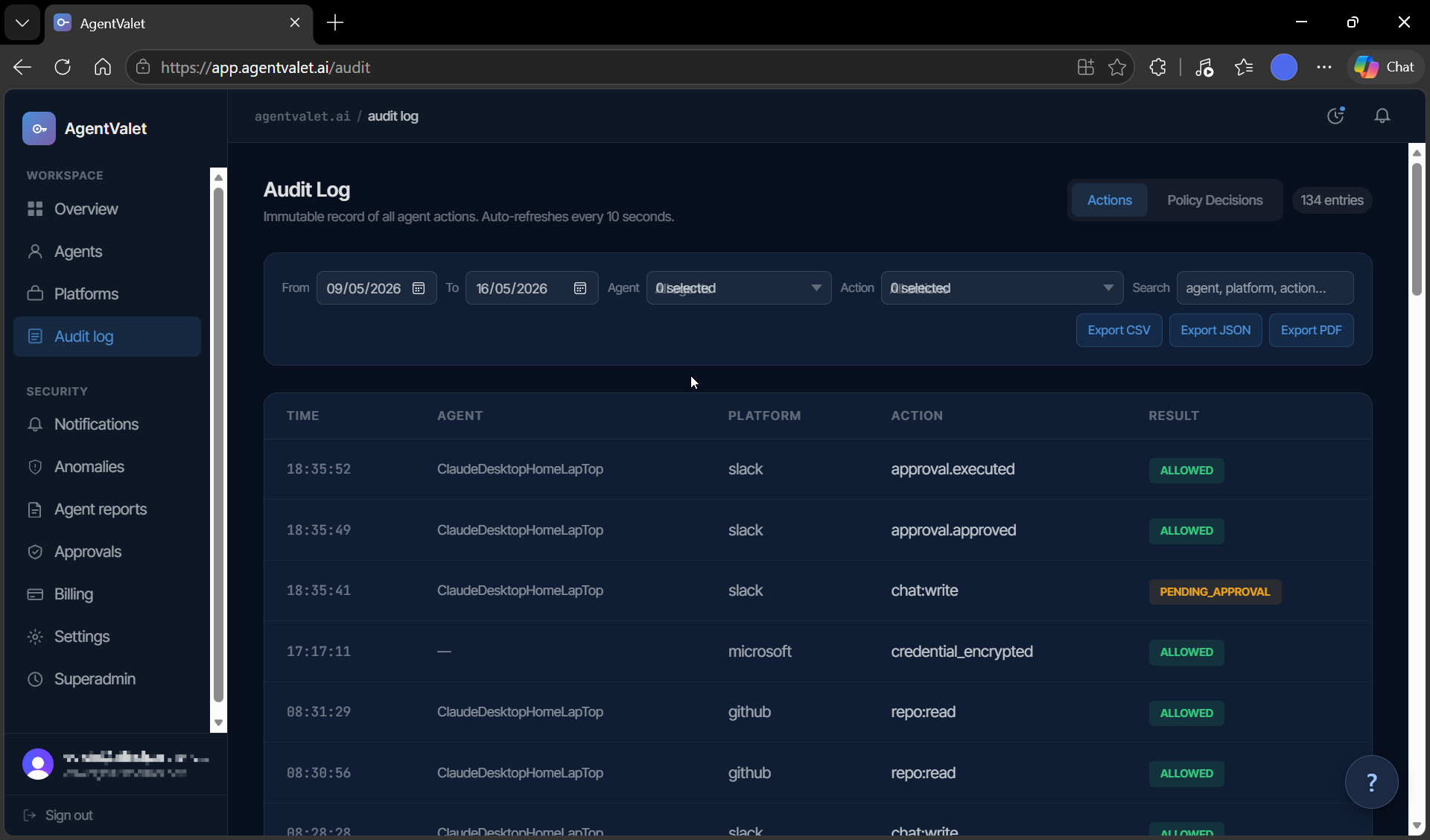
There are two tabs:
- Audit — the chronological log of agent actions (allowed, denied, pending, errored)
- Policy decisions — the underlying AuthZEN evaluations: subject, action, resource, decision, reason. This is where you go when you want to understand why something was denied beyond the surface-level error.
You can filter by date range, agent, action type, and free-text. Export-to-file is a Team-plan feature; the in-app filtering is on every plan.